Session Details
The Session Details panel lets you review and edit information for a Session.
Double-click a Session card to open the panel.
Session Details Viewer
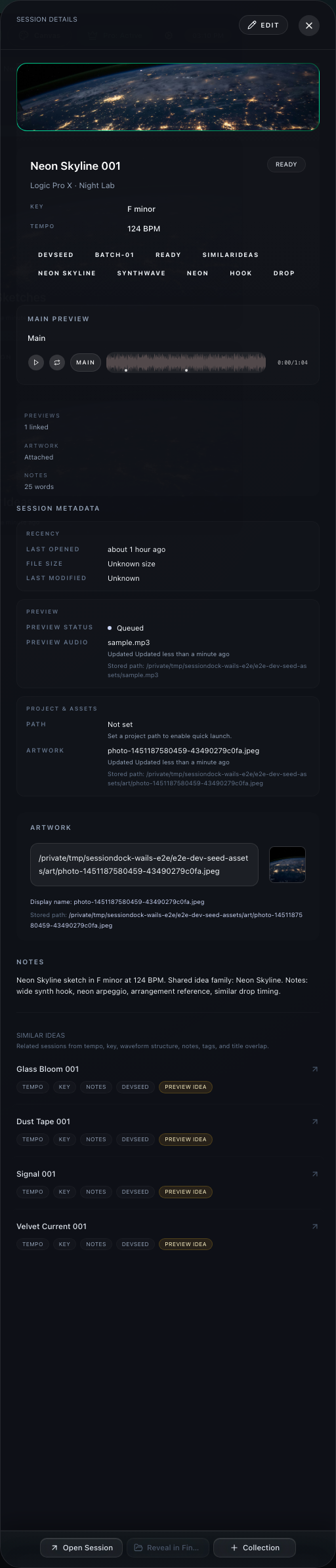
Use the viewer to quickly review a Session without changing anything.
From the viewer, you can:
- Review artwork
- Play the main preview
- Open the linked project
- View notes, metadata, tags, status, key, tempo, and client info
- Access controls like adding to collections or revealing the project folder
The numbered markers in the viewer screenshot point to these controls and information areas:
- Open Session button
- Main preview player
- Edit button
- Add to Collection button
- Reveal Project Folder button
- Artwork display
- Similar Ideas section
- Notes section
Session Details Editor
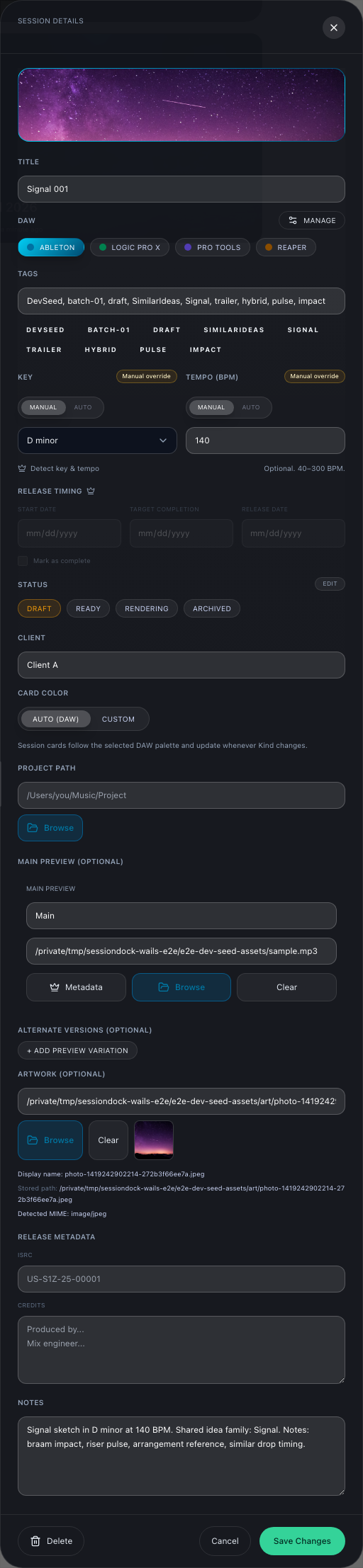
Click Edit to update the Session.
From the editor, you can change:
- Artwork
- Title
- DAW/type
- Tags
- Mix metadata
- Key
- Tempo
- Auto key detection (Pro)
- Auto tempo detection (Pro)
- Release timing (Pro)
- Status
- Client
- Preview-related information
The numbered markers in the editor screenshot correspond to these areas:
- Artwork
- Title, DAW/type, and tags
- Key, tempo, release timing (Pro), status, and client
- Preview-related information
- Release metadata and notes
- Save Changes
Saving Changes
After editing a Session, click Save Changes.
Use Cancel to close the editor without saving.